Stop Pasting Your OnlyFans Link Everywhere: Use a Link Page Instead
💬 Free Telegram help group: real creators, real answers
Let's be honest, gorgeous: pasting your OnlyFans link straight into your Instagram bio is like flashing the bouncer on your way into the club. It gets attention, but not the kind you want.
A link-in-bio page (Beacons, or a similar tool) sits between your social profiles and your paid pages. It looks innocent, it gives you data, and it keeps your accounts safer. Here's why it matters and how to set it up properly.
Why direct links to OnlyFans or MYM are risky
1. Social platforms don't like adult links
Instagram, TikTok, Facebook and YouTube all have rules around adult content and links that lead to it. A direct link to OnlyFans, Fansly or MYM Fans in a bio or caption can lead to:
- reduced reach (your posts quietly stop being shown),
- link removals or warnings,
- account restrictions or a full ban in the worst case.
A neutral link page doesn't make you invisible to moderation, but it lowers the risk and keeps the explicit stuff one click further away, where it belongs. The same logic applies when you buy traffic: our guide to paid ads for OnlyFans shows where to send it safely.
2. You lose control of the experience
A direct link sends fans to one place and that's it. A link page lets you guide them:
- your Telegram channel for daily teasers,
- your free socials,
- one or several paid platforms,
- a current offer ("this weekend only").
3. You're flying blind
A direct link tells you nothing. A link page shows you which source brings clicks: was it the Reel, the Threads post or the YouTube description? That's how you stop wasting time on channels that don't convert.
Every click you can't measure is a decision you're making blind.
Direct link vs link page
| Direct link | Link page | |
|---|---|---|
| Risk on socials | Higher | Lower (neutral landing) |
| Choice for fans | One destination | Several, in the order you choose |
| Analytics | None | Clicks per link and per source |
| Updating offers | Edit every profile | Edit once, everywhere updates |
| Brand feel | Generic | Your colors, your photo, your vibe |
How to set up a link page that converts
- Pick a tool and read its content rules. Some link-in-bio tools forbid adult links, others allow them with a sensitive-content warning. Policies change, so check before you build. We've used Beacons for its free analytics.
- Keep the top SFW. Your photo, a short flirty bio, your Telegram and free socials first. Paid platforms lower down, behind an 18+ notice if the tool offers it.
- Three to five buttons max. Too many choices = no choice. Put the one you want clicked at the top.
- Tag your traffic. Use a different link (or UTM tag) per social so you know exactly where clicks come from.
- Add a reason to click. "New set every Friday" or "Free teaser on my Telegram" beats a naked "OnlyFans" button.
- Check your stats every week. Double down on the source that converts, drop the one that doesn't.
Telegram: the perfect first stop
Our favorite trick: make your Telegram channel the first button on your link page. It's a space you control, where you can tease, chat and announce drops, then send the warmest fans to your paid page. We explain why in Telegram is a secret search engine and community vs commercial on Telegram. Whatever tool you use, the page needs one obvious action, which we call the big red button.
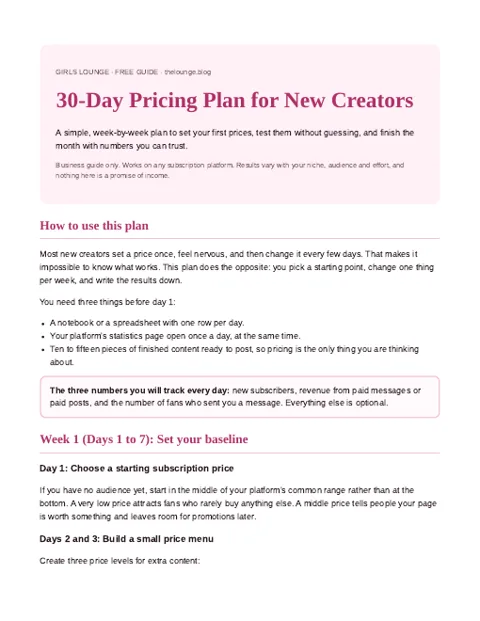
The free 30-Day Pricing Plan gives you a day-by-day checklist and a one-page rules template.
Join the creators group to get the plan
PDF pinned in the group. What is inside?
Traffic sources to plug into your link page
- Instagram & Threads: bio link only, SFW teasers. See Threads for creators.
- YouTube: link in the description of SFW lifestyle or behind-the-scenes videos.
- Reddit & X: check each community's rules on links before posting.
- Your own blog or SEO articles: evergreen traffic that keeps clicking for months.
Common mistakes
- Using the same link everywhere, so your analytics can't tell sources apart.
- Putting ten buttons with no priority.
- Forgetting to update an expired promo.
- Copying explicit preview images onto the link page itself.
FAQ
Why shouldn't I put my OnlyFans link directly in my Instagram bio?
Direct links to adult platforms can reduce your reach or get your account restricted. A neutral link page lowers that risk and lets you offer several options.
Is Beacons allowed for OnlyFans creators?
Many creators use Beacons and similar tools, but each tool has its own content rules that can change. Read the current policy before adding adult platform links.
What should I put on my link-in-bio page?
Keep it short: your photo, a short bio, your Telegram channel, your free socials and one or two paid platforms, ordered by priority.
How do I know which social brings me subscribers?
Use a different link or UTM tag per social network, then compare clicks in your link page analytics and your platform's tracking links.
Does a link page fully protect my account?
No. It lowers the risk, but you still need to respect each social platform's content rules in your posts and images.
Can I use one link page for OnlyFans, Fansly and MYM?
Yes. That's one of the main benefits: one link in your bio, several destinations you can reorder or update anytime.
Bottom line
Keep your bio sweet and your link page smart. Fewer bans, more data, and a smooth path from "who's she?" to "take my money". 💋